Stats & Search
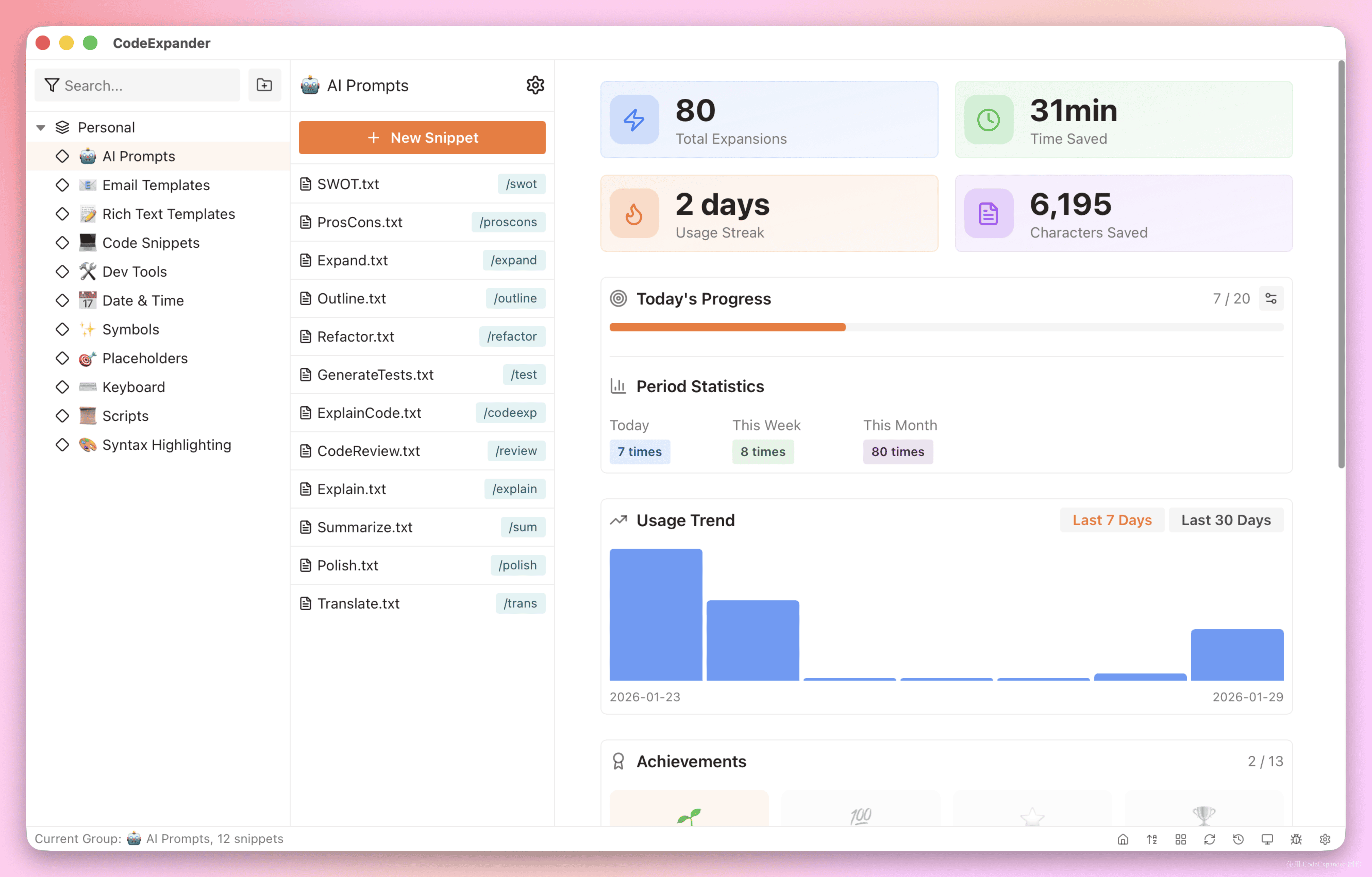
Stats & search in CodeExpander (Pro) means usage statistics (expand count, characters saved, time saved, trends, achievements) and full-text search over snippets with nested refs. See how much you use and where; keep your library findable. Access via Settings → Usage statistics and the global search shortcut.
Group Management
- Tree groups + prefix: Create groups by scenario (e.g. AI-Prompts/Code, Review); child snippets expand with prefix. See Introduction · Snippets.
- New / Edit / Delete: Right-click group tree or toolbar; add subgroup, rename, delete. Move snippets out before deleting a group; groups don’t store snippet content.
Usage Statistics & Trends
Usage statistics — Total expands, characters saved, time saved (estimate), streak; today/week/month, daily progress and goal (1–1000); top snippets, 7-day/30-day trends; achievement badges (by expand count, streak, characters saved); export CSV.
Quick Search
Global shortcut opens search; full-text over snippet name and content; expand or jump to edit. Configure in Settings → Shortcuts.
Nested Snippets
In snippet content use %s:abbr%; on expand it inserts the content of the snippet with that abbreviation. See FillIn · Function variables.