Stats & Search
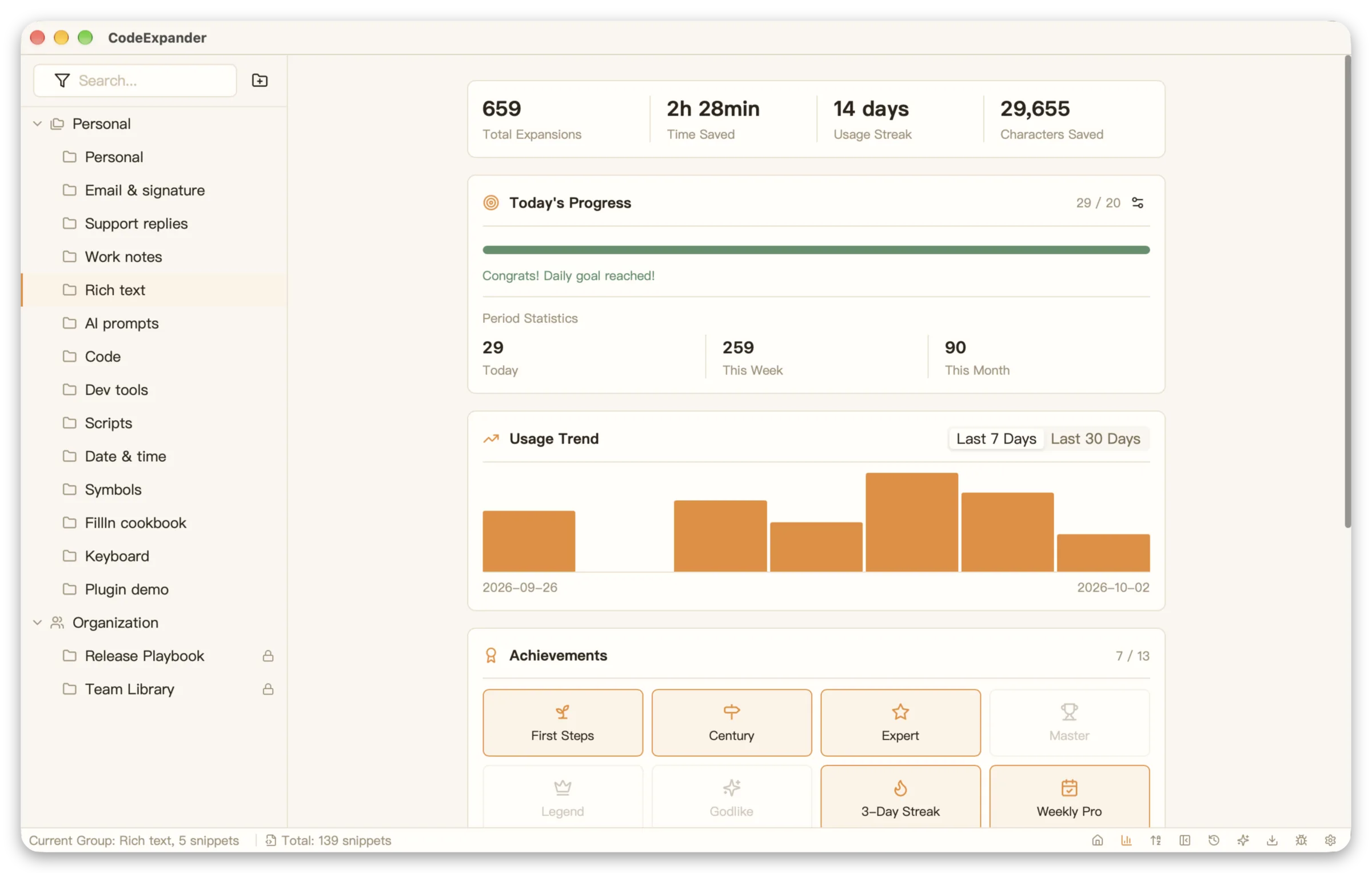
Stats & search in CodeExpander (Pro) means usage statistics (expand count, characters saved, time saved, trends, achievements) and full-text search over snippets with nested refs. See how much you use and where; keep your library findable. Access via Settings → Usage statistics and the global search shortcut.
Group Management
- Tree groups + prefix: Create groups by scenario (e.g. AI-Prompts/Code, Review); child snippets expand with prefix. See Introduction · Snippets.
- New / Edit / Delete: Right-click group tree or toolbar; add subgroup, rename, delete. Move snippets out before deleting a group; groups don’t store snippet content.
- Sort & drag: Groups support drag-to-sort for custom display order.
- Sync toggle: Each group can be set to “include in sync” or not, keeping sensitive or temporary snippets local.
Usage Statistics & Trends
View in Settings → Usage statistics (Pro): expand count, characters saved, time saved (estimate), streak; today/week/month, daily progress and goal (1–1000); top snippets, 7-day/30-day trends.
| Metric | Description |
|---|---|
| Total expands | Cumulative snippet trigger count |
| Characters saved | Cumulative characters saved from manual typing |
| Time saved | Estimated time saved based on average typing speed |
| Streak | Longest consecutive days with at least one expand |
| Top snippets | Most frequently used snippets |
| Trend charts | 7-day / 30-day daily expand count |
Achievements unlock by expand count, streak, and characters saved. You can export CSV, refresh, or reset (reset with care).
Quick Search
Global shortcut opens search; full-text over snippet name and content; expand or jump to edit.
Search Capabilities
- Snippet name: Search by abbreviation or snippet name
- Snippet content: Search keywords in snippet body
- Shortcut access: Configure global search shortcut in Settings → Shortcuts
- Instant expand: Press Enter on a search result to expand, or click to jump to edit
Tips
- When you forget an abbreviation, use global search by keyword
- With a large library, search is faster than browsing groups
- Combine with group prefixes: search
ai-to quickly list all AI-related snippets
Nested Snippets
In snippet content use %s:abbr%; on expand it inserts the content of the snippet with that abbreviation.
Example
header snippet (abbr header):
---
Author: %filltext&name=Author%
Date: %date%
---
body snippet (abbr doc):
%s:header%

## Overview
%fillarea&name=Overview%

## Details
%fillarea&name=Details%
Type doc + Tab → header content expands first → then fill the body form.
Notes
- Don’t nest too deep (recommended max 3 levels) to avoid complex logic
- Nested snippets can have their own FillIn variables; they pop up in order
- Circular nesting (A nests B, B nests A) is detected and prevented
See FillIn · Function variables.
Version History
Auto-saved version history per file:
- Auto-save: Edits are automatically saved to history as you work
- Version sources: Initial creation, auto-save, manual save, and apply operations
- Version diff: Side-by-side visual comparison; review line-level or formatted differences
- Restore: Roll back to any previous version with one click
Use Cases
- Accidental deletion → recover from history in seconds
- Compare changes → see exactly what changed between edits
- Experimental edits → try new ideas safely, roll back anytime